Hi there! I’m Miss New, a first year teacher, teaching at a charter school in Saint Louis City. I’ll be using this blog space to document my first year as a 2nd grade teacher. Here I’ll be sharing my experiences, resources, struggles, and successes!
FREE Student Holiday Gifts
It’s that time of year again, spreading the holiday cheer! If you’re a new teacher like me you’ve probably already spent your life savings and are definitely not earning enough to make it back anytime soon. As much as I wanted to give my students books for the holiday break, it just wasn’t in my budget.
After the teacher guilt subsided I decided to turn to my lifeline, Teachers Pay Teachers.
First idea, snowman soup! Perfect, a package of hot cocoa, Hersey kisses, and mini marshmallows all packaged with a cute little bow & tag.
Opps…
I ate a bag too many of the Hersey kisses. As I was about to buy another $3 bag. I decided to look again for other ideas.
And that’s when it hit me…

It’s perfect, I can gift one to my students and my students can gift one they create to their families.
I began searching for the perfect freebie on TPT. While there were many freebies to choose from, some even editable, I decided to quickly create my own personalized ones for my students in PowerPoint. You can find my freebie here.


Coupon books will be my go-to for gift giving to my students, why? Because they’re free, students WILL use them, and students LOVE getting coupons.
Here’s what my students will be gifting to their families.
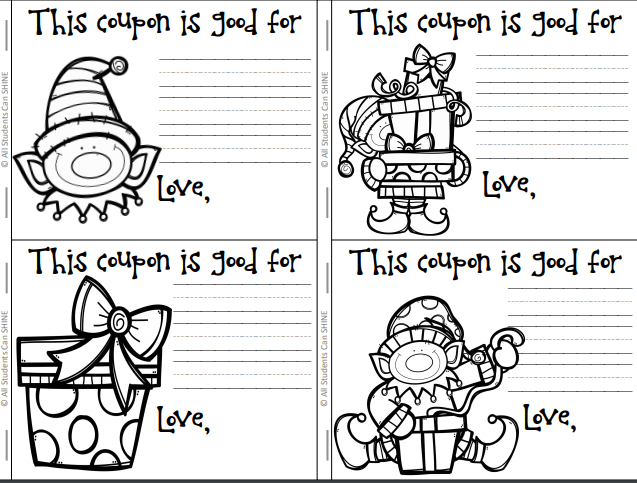
There is also a pre-filled version with the free download!
Hopefully, this has given you an alternative gift giving idea in the classroom.
What free or cheap gifts do you give to your students over the holidays?
Comment below!
Back from Break Survival Tips
After the wrath of “back from break” Thanksgiving break, I can only imagine how much my students will “forget” after winter break.
Hence, this blog post! I’ll be discussing ideas to help save your sanity on those first few days back because MLK day is four. entire. weeks. away.
No worries, this advice isn’t coming from me…
Cue my sanity, a saint, soul sister, blonde Mary Poppins, it’s Erica my teaching mentor!

Erica is a seven year teacher, two years in Saint Louis City and five at Gateway Science Academy. Not only is she my mentor, she’s also on my teaching team, very convenient!
Shortly after realizing that my students were struggling to get back on track, I reached out to Erica seeking advice for after winter break tips to help students regain temporary memory loss.
Here’s what she had to say.
Tip #1
“I started this a few years ago, and it helps cut down on some of the back to school excitement, have your morning work be a special holiday themed weekend news. Give your students the opportunity to share what they did over break in partnerships or with the whole class.”
-Erica

Linked above is the freebie I’ll be using. My plan is to incentivize it- if students finish their Winter Break News, they can use part their writing time to share the news on Seesaw.
Tip #2
“Rethink some of your routines that you have sent in place, if you want to do anything differently, now is the time to make those changes! If you want to set up your room differently, change procedures, and desk rearrangement- it’s a good time for a refresh!”
-Erica
Desk rearrangement was already on my to-do list, however modifying routines and procedures, I hadn’t thought of. I’m now thinking of changing up my Daily 5 routine. Feel free to comment how you manage this time below!
Tip #3
“Review routines and procedures with your students and don’t forget to introduce new ones! Rather than go all out like the first day of school I usually just ask students questions about expectations BEFORE we do something. For example, before walking in the hall we discuss the expectation. You can also hang up any charts you created on the first few weeks of school and reflect back to that!”
-Erica

Tip #4
“Not really a tip, just to let you know, on the first day most of your students will be tired, some might be sad, and some will be hyper! It’s a bag of mixed emotions. I like to use the first day to read LOT. We always continue with the curriculum, but I make sure to break up the day with many good stories!”
-Erica
I’m sure I’ll be able to relate!

Tip #5
“Right after the New Year is the perfect time to set new learning goals for each student! I usually incorporate this with a writing activity and a craft and it’s the first thing on my bulletin board.”
-Erica
Here are a few ideas…
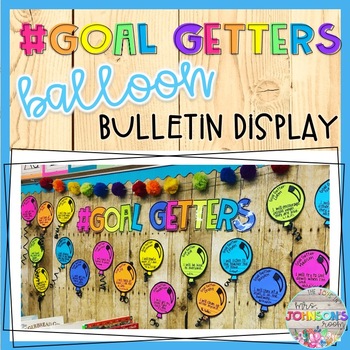
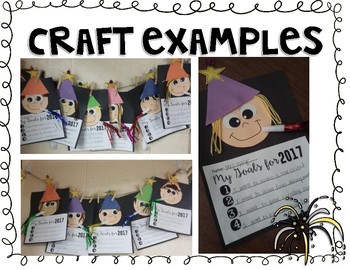
Hopefully Erica’s tips have given you some direction for back to school after winter break. They certainly did for me! I know that I’ll be using these tips and I’m very excited to give my room a refresh!
Please comment below if you have any additional advice, I’d love to hear from you!
Next week I’ll be sharing about something that MANY of my co-workers ask me about- Bulletin boards, AKA my pride and joy!
First Impressions of Seesaw
As promised in my last post, here’s a first impression of a digital learning tool I decided to incorporate in my 2nd grade classroom. I introduced my students to Seesaw last week, while it’s been around for a minute it was new to me! If you aren’t familiar with Seesaw it is essentially an online student portfolio. I post “activities” and students can respond by creating a video, photo, or voice over.

Pros
- It’s free
- It’s easy to set-up and students can be added with or without student email.
- My students LOVED IT. They were highly engaged, on task, and loved getting to share their writing through a video.
- My students needed minimal support, after one simple demonstration they were ready to go!
- Parents, coworkers, and administration can be added to the class.
- Posts have to be approved by the teacher or co-teachers.
Cons
- Without having a student email students cannot log on to Seesaw at home. This was a HUGE bummer to me. In second grade we do not have emails. My hope for Seesaw was to require one night of reading homework as a “Reading Response” assignment on Seesaw. Unfortunately that won’t be happening.
- My students don’t have microphones on their headphones therefore they have to use the Chromebook’s mic. When you’re having your entire class respond, it gets loud and some students are hard to hear in the video.
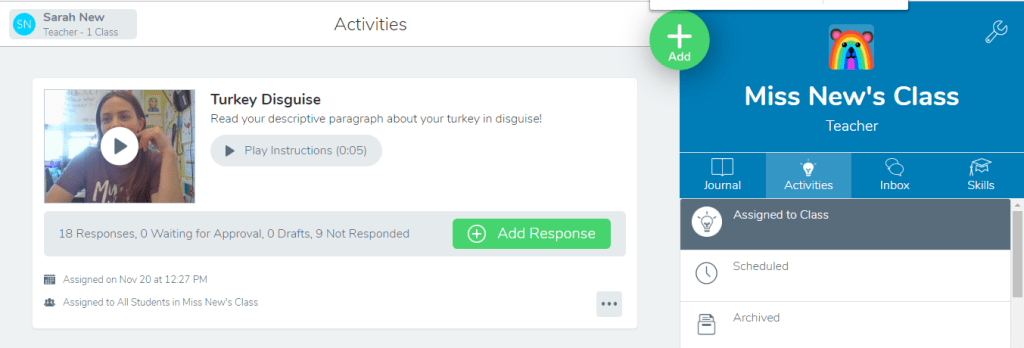
Overall my students and I both really enjoyed using Seesaw and I plan on incorporating it during my Daily 5 reading routine and once in a while for science and social studies. If Seesaw has sparked an interest in you, consider checking out this quick how-to video if you’re considering adding to your teacher tool box!
One last important thing to mention…
While discussing how to use Seesaw a student surprised me with an unexpected question, “If this is on the internet can other people see it?” I was shocked and delighted that a second grader would think to ask such a serious question. This inevitably led us into a conversation about privacy and security online and that MOST online sites aren’t as private as you might think, however, Seesaw’s activity is only accessible by the people who have our class code. Therefore anything we post is private, but we have to be safe about who sees our classroom code. Of course, I continued, sightly off topic, discussing how and why we should keep our passwords safe. This led to me informing my class that all posts have to be approved by me which students decided was a good thing in case they had messed up or done something embarrassing.
Next week I’ll be inviting my teacher mentor to discuss some back from break classroom management tips!
New Teacher + Digital Organization = Sanity Saved
If there’s one thing that makes a teacher’s heart happy, it’s organization! Before seeing my first classroom, I had everything figured out! The day I saw my classroom that all changed. My classroom is tiny! I couldn’t imagine having 26 students plus room for everything else, I knew that I had to make some serious changes. The first thing I decided to get rid of was the eyesore filing cabinet, and I’ve never looked back! Two words…

Digital organization through Google Drive has saved me time and space, and it’s also much better for the environment. The Drive allows me to save and organize my files, easily share resources with my team and save resources.
The first step is to create a grade level folder. If you’re like me and don’t plan on always being in the same grade, this is an important step.
The second step is to add additional folders to the grade level! Content areas, bulletin boards, and holidays are my favorites and most helpful! I also enjoy color coordinating my files. Pro-tip, if you’d like them to be in a specific order list them numerically.
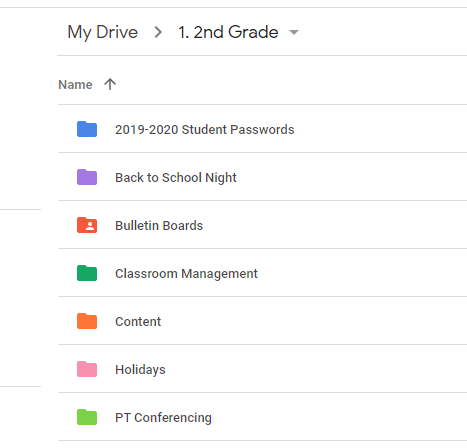
The third step is to click into a folder and create more folders as needed. The content folder is my favorite and most used. Inside I include reading, writing, math, science, and social studies. Within each of these content areas, I recommend including folders for the units and lessons. That way directly after downloading a TPT product, you can drop it into whichever lesson it goes with. If you don’t use a specific resource you may want to organize your content areas by skill rather than a lesson.
Creating folders is quick and easy, downloading and dropping files into the folders is even easier. I find this to be much easier and convenient than creating file folders and reorganizing each time I add something. If you’re looking for a step-by-step tutorial of setting up your Drive I highly recommend watching the video by Pocketful of Primary.
Hopefully, this tip will save you some sanity this school year. If you’re already 10+ years deep with your filing cabinet, start by going through a few documents at a time, scan what you want to keep and purge the rest. It’s never too late to get organized! Stay tuned for next week, I’ll be sharing my student’s first week of using a new digital tool!
About me

Former Hoosier turned St. Louisan, I reside in South Saint Louis City with my partner and three fur babies! I graduated in 2016 from Saint Mary-of-the-Woods College with a degree in Elementary Education. Since, I’ve moved to Saint Louis where I have worked as a teaching assistant and am now in my first year of teaching 2nd grade. I have 25 wonderful second graders that I spend most of my time with and all of the time thinking about!
When I’m not with my kiddos at school, I’m home with my partner and our animals. We enjoy hiking, paint by numbers, eating everything, and going to the gym- although that has been a struggle since starting the school year! Other than teaching, I also have a passion for health and fitness and riding horses.
Thanks for stopping by!
Ideas

Every teacher likes a list, right?
- Digital organization through Google Drive
- Getting the job- Interview and demo lesson tips
- Bulletin board creations
- How to Bulletin board letters
- Favorite read alouds
- How to Anchor charts
- Surviving PT conferences
- Surviving observations
- First job experience
 New in Second