If there’s one thing that makes a teacher’s heart happy, it’s organization! Before seeing my first classroom, I had everything figured out! The day I saw my classroom that all changed. My classroom is tiny! I couldn’t imagine having 26 students plus room for everything else, I knew that I had to make some serious changes. The first thing I decided to get rid of was the eyesore filing cabinet, and I’ve never looked back! Two words…
Digital organization through Google Drive has saved me time and space, and it’s also much better for the environment. The Drive allows me to save and organize my files, easily share resources with my team and save resources.
The first step is to create a grade level folder. If you’re like me and don’t plan on always being in the same grade, this is an important step.
The second step is to add additional folders to the grade level! Content areas, bulletin boards, and holidays are my favorites and most helpful! I also enjoy color coordinating my files. Pro-tip, if you’d like them to be in a specific order list them numerically.
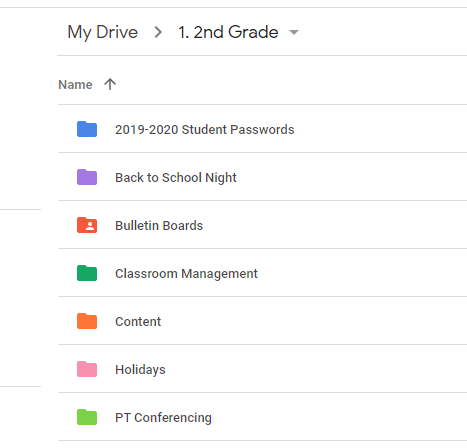
The third step is to click into a folder and create more folders as needed. The content folder is my favorite and most used. Inside I include reading, writing, math, science, and social studies. Within each of these content areas, I recommend including folders for the units and lessons. That way directly after downloading a TPT product, you can drop it into whichever lesson it goes with. If you don’t use a specific resource you may want to organize your content areas by skill rather than a lesson.
Creating folders is quick and easy, downloading and dropping files into the folders is even easier. I find this to be much easier and convenient than creating file folders and reorganizing each time I add something. If you’re looking for a step-by-step tutorial of setting up your Drive I highly recommend watching the video by Pocketful of Primary.
Hopefully, this tip will save you some sanity this school year. If you’re already 10+ years deep with your filing cabinet, start by going through a few documents at a time, scan what you want to keep and purge the rest. It’s never too late to get organized! Stay tuned for next week, I’ll be sharing my student’s first week of using a new digital tool!
 New in Second
Sarah,
I am so glad you thought of new teachers experiencing the overwhelming fear of “organizing”. I too use Google Drive. I have only been on it about 5 years, but it is amazing how easy it is, and it can go with you everywhere! Just last night at 11:00pm I was using my Drive and Google Classroom to set up substitute plans. All with the click of a few buttons. I have taught for twenty years and things have really changed. It can get overwhelming when you are not a natural at technology. I find that your tutorial would also benefit us 40+ teachers who may be too scared or unsure to try Google. It is not that experienced teachers do not want to change, it is the fear of the unknown. Second grade is the best! I have taught it almost ten years. It is a great place to learn and grow! Thanks for sharing. Misty
LikeLike
Misty,
Thank you for your thoughtful comment! I truly dread having piles of paper around my desk and having to file things so Google Drive was a no-brainer for me! I hadn’t thought about creating last minute sub plans to share via Drive, awesome idea!
LikeLike