As promised in my last post, here’s a first impression of a digital learning tool I decided to incorporate in my 2nd grade classroom. I introduced my students to Seesaw last week, while it’s been around for a minute it was new to me! If you aren’t familiar with Seesaw it is essentially an online student portfolio. I post “activities” and students can respond by creating a video, photo, or voice over.

Pros
- It’s free
- It’s easy to set-up and students can be added with or without student email.
- My students LOVED IT. They were highly engaged, on task, and loved getting to share their writing through a video.
- My students needed minimal support, after one simple demonstration they were ready to go!
- Parents, coworkers, and administration can be added to the class.
- Posts have to be approved by the teacher or co-teachers.
Cons
- Without having a student email students cannot log on to Seesaw at home. This was a HUGE bummer to me. In second grade we do not have emails. My hope for Seesaw was to require one night of reading homework as a “Reading Response” assignment on Seesaw. Unfortunately that won’t be happening.
- My students don’t have microphones on their headphones therefore they have to use the Chromebook’s mic. When you’re having your entire class respond, it gets loud and some students are hard to hear in the video.
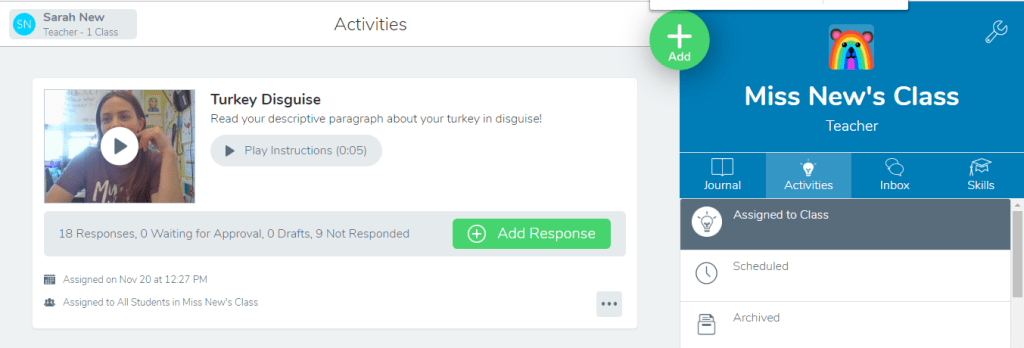
Overall my students and I both really enjoyed using Seesaw and I plan on incorporating it during my Daily 5 reading routine and once in a while for science and social studies. If Seesaw has sparked an interest in you, consider checking out this quick how-to video if you’re considering adding to your teacher tool box!
One last important thing to mention…
While discussing how to use Seesaw a student surprised me with an unexpected question, “If this is on the internet can other people see it?” I was shocked and delighted that a second grader would think to ask such a serious question. This inevitably led us into a conversation about privacy and security online and that MOST online sites aren’t as private as you might think, however, Seesaw’s activity is only accessible by the people who have our class code. Therefore anything we post is private, but we have to be safe about who sees our classroom code. Of course, I continued, sightly off topic, discussing how and why we should keep our passwords safe. This led to me informing my class that all posts have to be approved by me which students decided was a good thing in case they had messed up or done something embarrassing.
Next week I’ll be inviting my teacher mentor to discuss some back from break classroom management tips!
 New in Second
I have personally used Seesaw during a leadership training, but I have never used it with my students. It seemed to be pretty user friendly the few times I’ve used it. I teach 5th grade and think my students would be more than able to handle with minimal support. My only real hesitation with incorporating Seesaw – or any other online tool – is that we already have so many other accounts for different things (Epic, MobyMax, XtraMath, Edulastic, Scratch, Google Classroom) that I don’t want to overwhelm with too many tools. What are some things you could see an upper elementary classroom using Seesaw for? In what ways could I enhance the learning using Seesaw? Thanks for sharing!
LikeLike
Hi Jennifer,
Thank you for your comment! You bring up a great point, I too struggle to incorporate all of the digital tools that feel “required” by admin. I like Seesaw because it’s different from everything else that I’m already using. I’m not using google classroom, which I could see aspects of being similar to Seesaw. I primarily use it for student writing, presentations, and book chats. Any of these would be beneficial and are appropriate for upper elementary.
LikeLike